
ZF Volume Control1.5 - Google Play
You'll be able to see results in few seconds.
Publisher Description
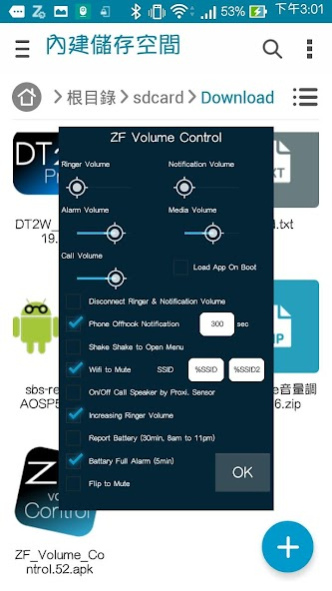
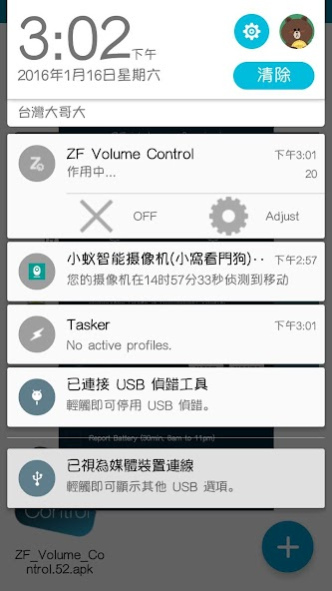
ZF Volume Control has following functions:
1. disconnect ringer & notification volume
2. flip your phone to mute (pro ver)
3. auto mute when your phone connects to office's wifi
4. when a call in-coming, auto increasing the ringer volume every 5 sec (pro ver)
5. vibrate your phone when call-in and call-out, every 300sec. (you can define the vibrate period)
6. make a notify let you know your battery is full after 5 min
7. from 8AM to 11PM, use google TTS let you know what time is it, every 30 min
8. when your phone offhook, use proximity sensor on/off phone speaker (pro ver)
ZF Volume Control 有以下功能:
1. 斷開通知與電話鈴聲的音量綁定
2. 捐贈版: 翻轉手機朝下自動靜音
3. 連上特定的WIFI自動靜音
4. 捐贈版: 漸進式鈴聲音量
5. 打電話時,每300秒(可設定)震動一次提醒通話時間
6. 當手機充飽電時,發出聲音並通知你可移除電源
7. 早上八點至晚上十一點區間,使用Google語音每三十分鐘報時
8. 捐贈版: 打電話時自動利用距離感應器來開關擴音器
------------------
Change Log:
- make control panel bigger
About ZF Volume Control
The company that develops ZF Volume Control is suc1982. The latest version released by its developer is 1.5.
To install ZF Volume Control on your Android device, just click the green Continue To App button above to start the installation process. The app is listed on our website since 2016-02-01 and was downloaded 0 times. We have already checked if the download link is safe, however for your own protection we recommend that you scan the downloaded app with your antivirus. Your antivirus may detect the ZF Volume Control as malware as malware if the download link to com.suc1982.zfvc is broken.
How to install ZF Volume Control on your Android device:
- Click on the Continue To App button on our website. This will redirect you to Google Play.
- Once the ZF Volume Control is shown in the Google Play listing of your Android device, you can start its download and installation. Tap on the Install button located below the search bar and to the right of the app icon.
- A pop-up window with the permissions required by ZF Volume Control will be shown. Click on Accept to continue the process.
- ZF Volume Control will be downloaded onto your device, displaying a progress. Once the download completes, the installation will start and you'll get a notification after the installation is finished.
Program Details
System requirements
Download information
Pricing
Version History
version 1.5
posted on 2016-02-02
if headset is plugged, turn off auto speaker function
Disclaimer
Official Google Play Link
We do not host ZF Volume Control on our servers. We did not scan it for viruses, adware, spyware or other type of malware. This app is hosted by Google and passed their terms and conditions to be listed there. We recommend caution when installing it.
The Google Play link for ZF Volume Control is provided to you by apps112.com without any warranties, representations or guarantees of any kind, so access it at your own risk.
If you have questions regarding this particular app contact the publisher directly. For questions about the functionalities of apps112.com contact us.
